
You do not have to know the command names
The toolkit installs seventeen commands, and the usual way to reach one is not to type it. You describe what you want in your own words, and the command whose trigger matches what you asked starts on its own. Typing /develop is how you overrule that choice, not how you make it.
So the short answer to "how do I ask for a change" is: say what you want, say where you want it, and say whether something is broken. Everything below is what happens after that, in the order it happens. If none of it is installed yet, start at Install the toolkit.
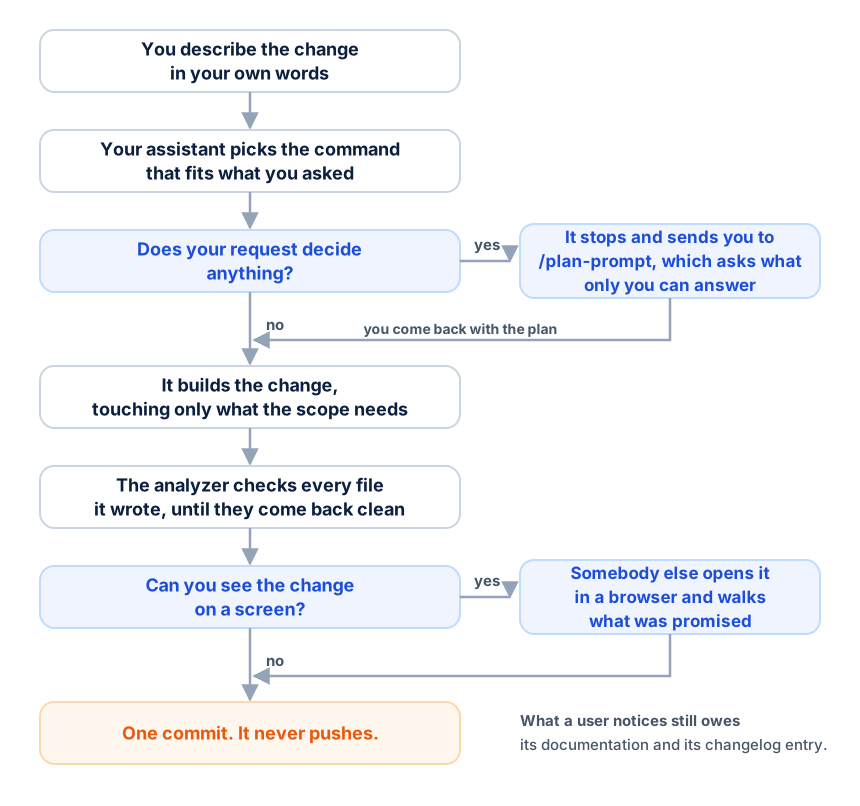
1. You describe the change in your own words
Name the thing a person would name: the screen, the button, the flow, the record. You do not have to name a file, a class or a component, and you are not expected to know where the code lives.
Two details are worth adding on your own, because both change what happens next. Say whether something that used to work is failing now, and say what you see when it does. And if the result depends on something — a role, an empty list, an expired coupon — say so, because the states you name are the states the change will be built and checked against.
2. Your assistant picks the command that fits what you asked
Describing a feature starts the implementation command. Asking how something would be done starts the planning one. Saying a screen ought to work and does not still starts implementation, which begins by reproducing what you described.
You can always name the command yourself when you want a specific one. What each command does is the list, with the reason to reach for another.
3. Does your request decide anything?
This is the fork the rest of the path turns on. A request that decides something — two real routes and no obvious answer, a rule that comes out one way for one record and another way for the next — is planned before it is built.
Planning is a separate step, and nothing starts it behind your back. If you asked for the change to be built and it turns out to hold a real decision, the run stops before a single file is touched and tells you to plan it; it never starts the planning session on your behalf. What planning does with your answers, and how to tell a decision from a missing fact, is in Planning before building.
A request that decides nothing skips this entirely and goes straight to being built.
4. It builds the change, touching only what the scope needs
Edits stay inside what was agreed. Code the task did not have to touch is not reordered, renamed or tidied on the way past, and no formatter is run. Something that looks wrong outside the scope is reported to you rather than changed.
If the work reaches further than your request covered — it turns out to touch a flow nobody named — that is a stop, not a quiet expansion.
5. The analyzer checks every file it wrote
Each file the task wrote is sent to the analyzer with its full contents, every error that comes back is fixed, and it is sent again until it comes back clean. Findings in untouched legacy code elsewhere in the same file are reported to you instead of becoming work nobody asked for.
If the connection to the server is down you are told so plainly, and an internal reviewer stands in — reported as a different thing, never as an analyzer pass. See Read a finding and What the analyzer cannot check.
6. Can you see the change on a screen?
If you can, somebody else opens it. The command that built the change does not walk its own work in a browser: the verification command does, against what was promised, point by point, and hands back one result per point and a single verdict.
A failing pass is not the end of the line. It comes back as a correction written into the same plan, ready to be built, and it gets built and verified again — three builds in all, after which the plan rather than the code is what needs revisiting.
A change nobody sees on a screen — a command, a job, a service, a migration — is proved by running it instead. A change that is both is proved in both places.
7. One commit, and it never pushes
What was proved becomes a single focused commit, staging only the files the task owns, with the message in English even when you worked in another language. Nothing is pushed, no branch is created, and no earlier commit is rewritten. The hash is in the report.
The two questions you will actually be asked
Most of what is missing gets looked up rather than asked. Two things do reach you.
What only you can answer. Facts nobody wrote down arrive together, in one message, before any file is touched — never one at a time. A real decision does not arrive as a question at all: it stops the run and sends you to plan it.
Whether a risky write may happen. Asked once, before code is written, and only for what could lose or irreversibly change data that is not yours to lose: an environment that does not confirm as local, a database that looks like it holds production data, a migration rewriting a column on a table that already has rows, an external service pointing at a production account. It arrives with all three facts — what was found, what has to be run to prove the change, and what it could cause — and it is not asked again afterwards.
Ordinary local work is not one of these. Creating a test user, running a seeder and signing in as a seeded account happen without asking.
What comes back at the end
A report, and it is worth reading to the last line. It names what was built and which files changed, walks the checklist point by point with the evidence each point was marked against, says what was run to prove the change, how the browser pass came out, and the commit that was created — or why none was.
A point with no evidence is not reported as done. A blocked point is named with its reason, and the points that were proved beside it still ship.
The help is already written: when the change is something a user would notice, the same run that builds it writes its feature item and its guide. What the last line names as still owed is the changelog, and /finish from the main branch is what writes it.
Next
- Which route your change takes — the same path walked four times, once per kind of change.
- Planning before building — when the planning step earns its cost.
- How a task travels — the same journey from the inside, gate by gate.
- The agents behind a command — who each step is handed to, and why the one who writes the code is not the one who signs it off.