
A command only your project has
The toolkit's commands are the same for every project. Some work only makes sense in one: preparing the release notes the way that client wants them, checking the payment settings of a particular integration, running a routine your team repeats every week. An internal command is that routine, written once and run by name.
It is not a file in your repository. It is saved in your project in the toolkit, in its commands/ folder, so:
- It is the same on every branch — switching branches never hides or changes it.
- It works on every computer connected with your token, without copying anything.
- Only you see it, like the rest of your project's documents.
Two commands handle them: /make-command writes one and /call runs it.
Write one
-
In the repository of the project, type
/make-commandfollowed by a name and what the command should do. For example:/make-command release-notes write the release notes of a version from its commits, in the format the client approved in brand/release-format.md -
Answer what your assistant still needs. It asks only what you did not already say, all at once: what the command is for, what information it receives when you call it, what you should have when it finishes, and whether it reads a document of the project.
-
Read the full text it shows you. It has a title with the name, a one-line description, a What it receives section and a What it does section, written in your language.
-
Approve it, or say what to change. Nothing is saved until you approve.
Once approved, the command shows up in your project under Projects, inside its commands/ folder:
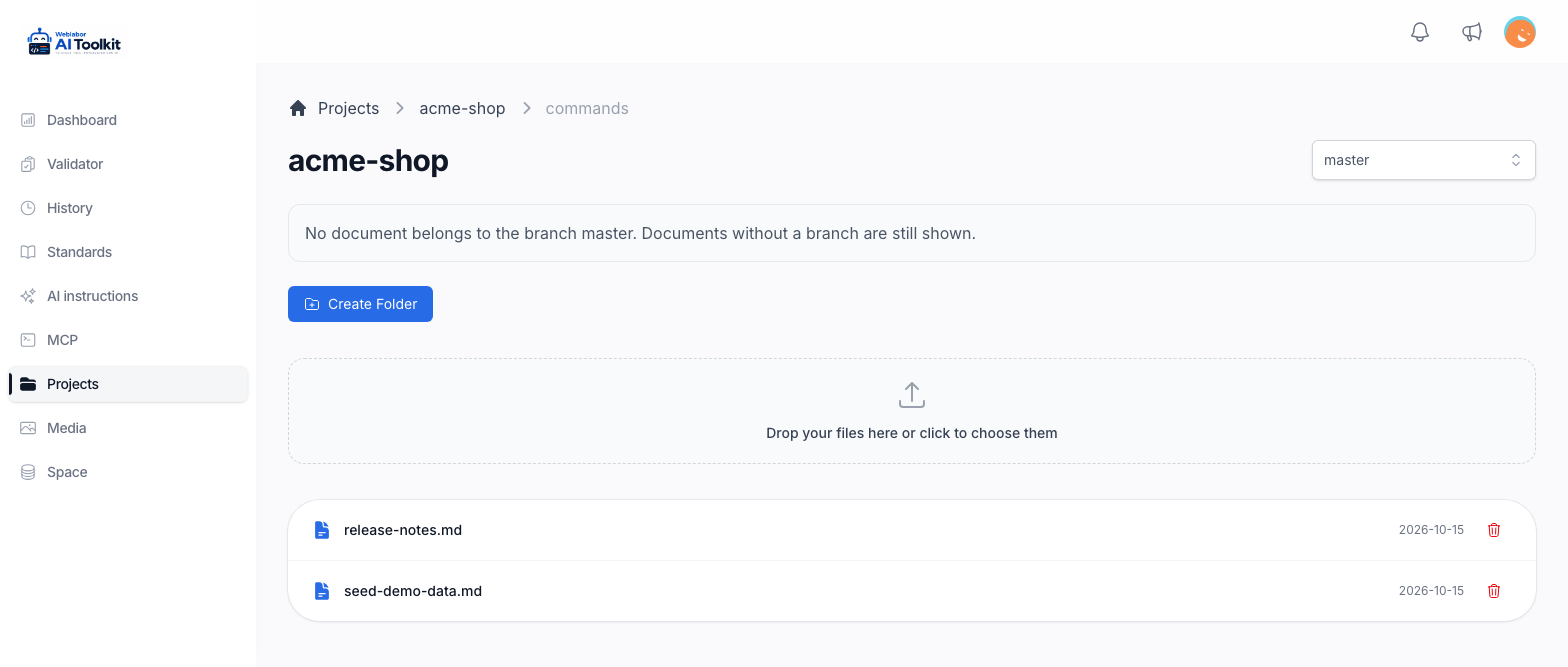
The name must be lowercase words joined by hyphens, such as release-notes, and cannot be the name of one of the toolkit's own commands or agents. Your assistant refuses anything else and suggests a name that works.
Run it
Type /call followed by the name and the information it receives:
/call release-notes 2.4.0
Your assistant says in one line which command is about to run, then follows it. An internal command runs under the same rules as any other request: it still asks before changing anything, still validates what it writes, and cannot switch off a rule of the toolkit. It runs only when you call it.
/callwith no name lists your project's internal commands, each with its one-line description.- A name that does not exist shows the same list and suggests the closest one. Nothing runs until you call it by its right name.
- A project with no internal commands says so and points you to
/make-command.
Change one
Run /make-command again with the same name. Your assistant shows the current text first, asks what to change, and saves the new version once you approve it.
You can also change it by hand in Projects, as Your projects and their documents describes: open the command in the project's commands/ folder and press Edit, or upload a .md file named after it into that folder. An upload with a name that already exists asks whether to replace the document, and only the content changes. Either way, follow the same shape — title, one-line description, what it receives, what it does — so /call lists it properly.
When the connection is down
Both commands stop and say so when your assistant cannot reach the toolkit. They never look for the command in your repository instead: the project in the toolkit is the only place internal commands live.
Working documents work the same way
The same place holds the working documents you ask your assistant to keep — a research, a manual of your functions, notes to come back to. Saying "save this" is enough; to read one, create one, or have one updated as you go, use /cloud-doc followed by its path, such as /cloud-doc research/payments.md. Code documentation and the help guides stay in your repository, and so does anything you ask to be saved there.
Next
- What each command does — the toolkit's own commands, and which one to reach for.
- Your projects and their documents — browsing the documents of a project and uploading your own.