What a token is, in practical terms
A token is your access to the analyzer, and an MCP token is also your access to the documents of every project you own — plans, vision, pending findings, internal commands and working documents — to read, change and delete. Every call carries one — there is no anonymous access, and a client that sends none gets an error its interface shows as a failed tool.
It is also your name on the work. Whatever is analysed with your token is recorded against you in the history, so a token you handed to someone else is your history with their code in it.
Creating your first one is covered in Get your access token. This guide is about living with the ones you already have.
One per person, one per place
Two rules keep this simple.
One per person. A token stands for you, not for the team. Everyone who connects an assistant generates their own from their own account. Sharing one means nobody can tell whose work is whose, and revoking it cuts off everyone at once.
One per place you connect from. A token for the assistant on your laptop, another for the one on your desktop, another for a machine you are trying something out on. The cost is nothing and the benefit is real: when one machine has to be cut off, you revoke the one token and everything else keeps working.
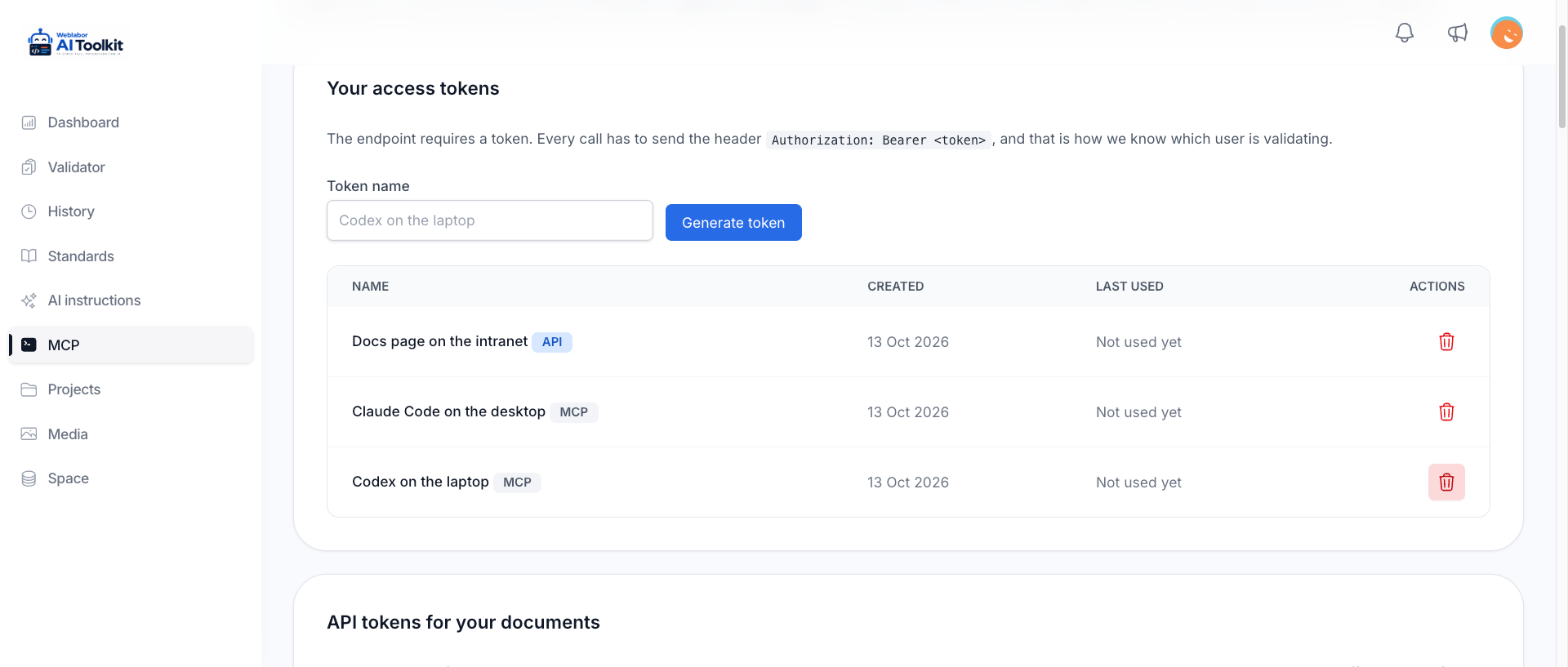
Name them so that future you can tell them apart. The name field suggests the shape — the client and the machine, not "token 2".
Reading the list
Each token shows its name, the day it was created and when it was last used, or that it has not been used yet.
That last column is what makes a periodic look worthwhile. A token nobody has used in months is a token nobody will miss, and one being used when you are not working is worth asking about. Revoke anything you cannot account for — the cost of being wrong is one reconnection.
The token is shown once
When you generate one, it appears on screen with a note telling you to copy it now. Only its fingerprint is stored, so nobody — including us — can show it to you again. If you lose it, you do not recover it: you generate a new one and revoke the old.
Put it where a running client can read it and a repository cannot. Every connection route the platform documents reads the token from an environment variable or a connector setting rather than from a file in your project, and that is the point: a token committed to a repository is a token in everyone's checkout and in the history long after you delete the line.
Rotating a token without downtime
Do it in this order and nothing stops working:
- Generate a new token and copy it.
- Point the client at the new token and restart the session, so the connection is made with it.
- Confirm the client is really using the new one by running an analysis.
- Revoke the old token.
Revoking first and reconnecting after works too, but it leaves your assistant unable to validate anything in between — and an assistant that cannot reach the analyzer is one whose output nobody has checked.
Rotate when someone who had access leaves, when a machine is lost or handed on, when you suspect a token has been seen by anyone else, and on whatever schedule your team decides. There is no expiry that does it for you.
Revoking, and what it does immediately
Revoke asks you to confirm, and the question names what the token was doing. Once you confirm, it stops working:
- With an MCP token, any AI client using it has just lost access: its next call fails and the tools disappear from its session until it is reconnected with a valid token.
- With an API token, the pages that show your documents with it stop reading them on their next request.
Revoking is not reversible and is not a pause. There is no way to bring the same token back, so reconnecting means generating a new one.
What revoking does not do is close a browser session. That is Your profile and language, under connected devices.
MCP tokens and API tokens
Your tokens come in two kinds, and the list marks each one MCP or API.
- An MCP token connects an assistant. Through it the assistant reads, creates, changes and deletes the documents of every project you own, as well as using the analyzer. It does not work on the documents API.
- An API token lets another application of yours list and read your documents to show them on its own page, as Show your documents in another project explains. It does not connect an assistant, and it cannot create, change or delete a document, because that way in only reads.
Keeping them apart means the token that sits on another application's server can never be used to work as your assistant, and your assistant's token is never handed to another application.
An API token is not harmless. It reads every project you own, not only the one the other application shows, so one that leaks exposes all your documents. Keep it on that application's server, never in a page a browser downloads, give each application its own, and revoke it the same way as any other the moment you suspect it got out.
If a token gets out
Revoke it first, before anything else — that is the one action that stops it being used, and it takes a second. Then generate a replacement, connect the clients that needed it, and look at the analysis history for work you do not recognise.
Nothing about the analyzer reads files from your computer: your assistant sends a path and the file's contents. A token is worth that access plus your name on it — and an MCP token, on top of that, the documents of all your projects, which whoever holds it can read, change or delete. That is worth protecting, and revoking it is still enough to cut it off. Check your projects for documents you do not recognise as well.
Next
- Connect Claude Code — pointing a client at a new token.
- Install the toolkit — what an assistant gets once it is connected.