Where it is
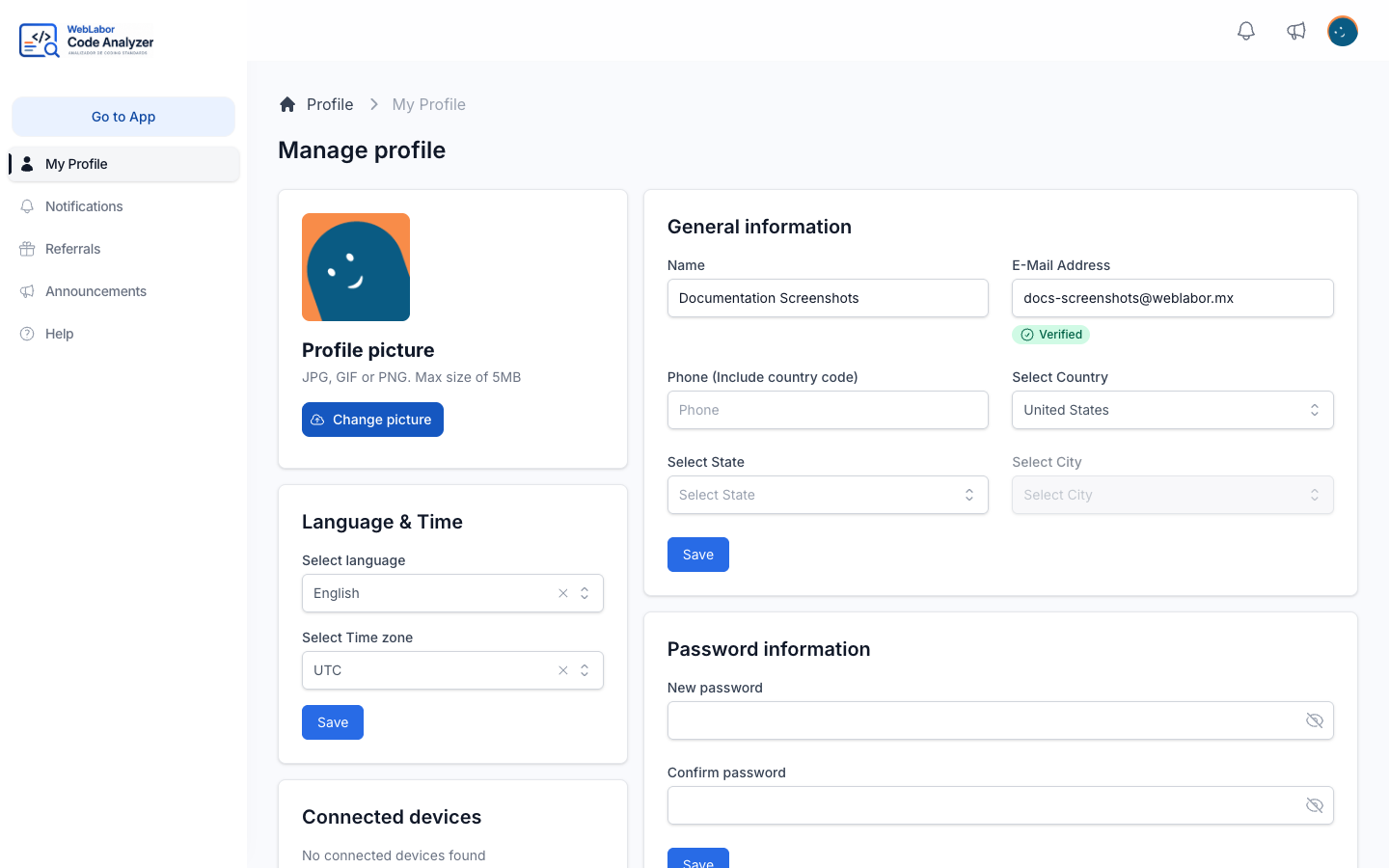
Everything about your account lives on one page, Manage profile. Each block on it saves on its own: press Save inside the block you changed and the rest is left alone.
General information
Your Name, the identity you sign in with, and where you are — Select Country, Select State, Select City. The state and city lists follow the country you pick, so change the country first.
Which identity fields you see depends on how sign-in is set up for you: an E-Mail Address, a Phone (Include country code), a Username, or more than one of them.
If the site asks for verification, changing your email or phone is not a matter of typing the new value and saving. You are asked to confirm it with the code sent to it first, and the field says so — the save does not go through until you do. That is what stops a typo from locking you out of the address you sign in with.
Profile picture
Under Profile picture, drop an image on the box or click it to choose one — a JPG, GIF or PNG up to 5MB. It updates as soon as the upload finishes; there is no separate save. The picture is kept in the Profile folder of your Media library — see Your media library.
When you already have a picture, the new one asks Replace … with …? first: Keep it in the media library leaves the old picture in the library, Delete it from the media library deletes it from there too, and Cancel keeps the picture you had.
Beside the current picture, Remove from this record takes it off your profile and leaves it in the library, and Delete from the media library deletes it altogether.
Language and time
Two settings, saved together.
Select language chooses the language the platform answers you in — Spanish or English. It changes the whole panel, including the commands and agents listed under AI instructions: pick Spanish and you read the full instructions of every command in Spanish.
What it does not change is what your AI assistant receives. The connection always serves the English original, because an agent following a translation would be following a document nobody reviewed. So you can read a command in Spanish while your assistant runs the English text of the same command — same content, one reviewed source.
Select Time zone decides how times are shown to you across the platform: when a token was last used, when something was analysed, when an entry was published. It does not change anything about when things happen, only how they read.
Password information
Set a new password by typing it in New password and again in Confirm password, then saving. A password is at least 8 characters. There is nothing to confirm by email afterwards — the change takes effect immediately.
If your account has a Security PIN enabled, it is managed in its own block on the same page. That is a 4-digit PIN used to confirm your identity for important actions, and it is separate from your password.
Connected devices
A list of the sessions currently open on your account, each with where it was seen, its address and its Last activity. The one you are reading this on is marked This device.
Disconnect ends one of them. Disconnect all other devices ends every session except the one you are using, which is the quickest answer to a laptop you no longer have or a session you do not recognise.
Disconnecting a device does not touch your access tokens. A session and a token are different things: closing a browser session on an old laptop leaves any assistant using a token still connected. Revoking is covered in Keep your tokens safe.
Notifications
Email notification turns on mail about actions on your account. Push notification appears when the site supports it and asks your browser for permission the first time you switch it on; it applies to the browser you are in, not to your account as a whole, so each browser is switched on separately. Test sends one to the browser you are in so you can check it arrives before relying on it.
Deleting your account
Delete Account asks you to confirm and then removes the account and everything attached to it. It cannot be undone and there is no grace period. If what you actually want is to stop an assistant from reaching the analyzer, revoke its token instead — see Keep your tokens safe.
Next
- Keep your tokens safe — rotating and revoking the tokens your assistants use.
- What each command does — the commands you can then read in the language you just chose.